After building a number of indoor robots, we decided to build an outdoor robot capable of traveling through rough terrain. We call it “Trekker.”
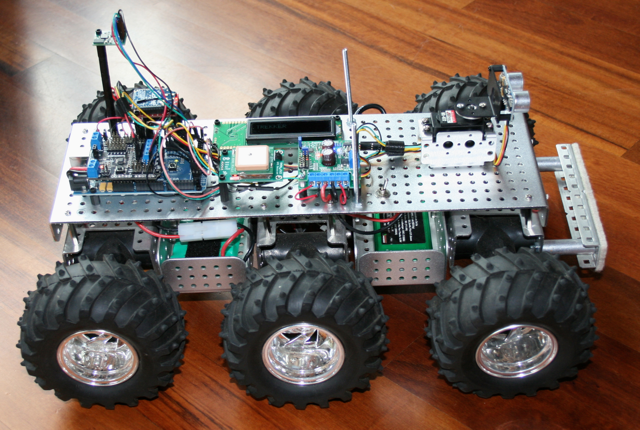
TREKKER ROBOT. Six wheels. Six motors. Batteries below deck. Electronics above deck.
First, we put together a six-wheel independent suspension with a separate motor on each wheel and large knobby tires. Each wheel moves up and down separately, which allows this little beast to climb up and over just about any obstacle (rocks, slopes, cats, whatever gets in its way). Here is a video of Trekker going over a large pile of books.
This is by far our funnest robot to drive via Remote Control, but this true magic of Trekker is his navigational capabilities.
We wired Trekker with a GPS chip and a tilt-compensated magnetometer (an electronic compass that works even when the robot is tilted). When Trekker first comes on, he automatically looks for and synchs with as many satellites as he can find in the sky (usually about 10-15). We programmed Trekker to determine his exact latitude and longitude position using the GPS as well as his directional orientation using the magnetometer. He then travels on his own to a series of latitude and longitude waypoints (that we get from Google Earth). Trekker’s navigational algorithm was one of our most ambitious software challenges to date. Our favorite test run is to put him in our backyard and give him instructions to drive around the big tree, down to the barn, drive around the goat pen, and return to us. He does it beautifully, all on his own, moving systematically from one waypoint to another. We also equipped him with a forward-facing sonar, which swivels back and forth on a pan servo, to avoid trees and other large obstacles along the way.
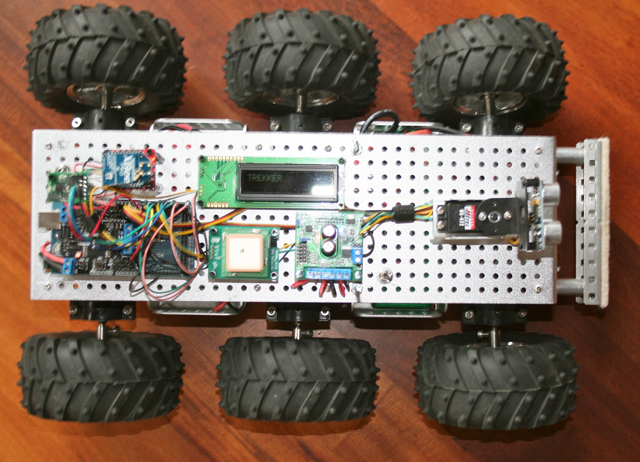
Trekker Robot – Top View – The white square in the middle is the GPS, which is used for navigation. When traveling between waypoints, the Longitude and Latitude display on the little LCD screen.
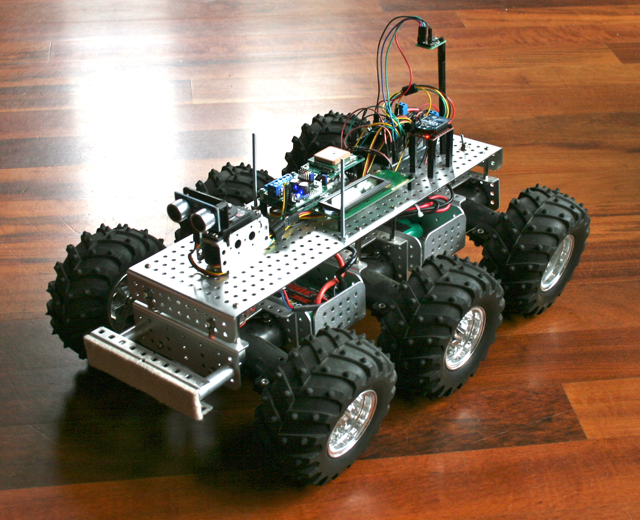
Trekker – Front View – This provides a nice view of the sonar at the front of the robot, which is used for obstacle detection and avoidance when traveling in automated mode. The magnetometer (compass) is mounted on a tall shaft at the back of the robot to keep it clear of interference from the other electronics, especially the radio.
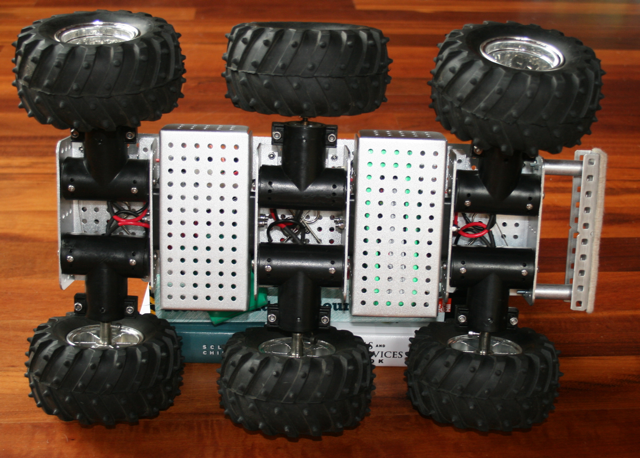
This picture of Trekker’s underside shows how each wheel connects to a separate motor (black t-shaped things). Each motor housing is on springs and swivels so that it moves separately from the other motors.
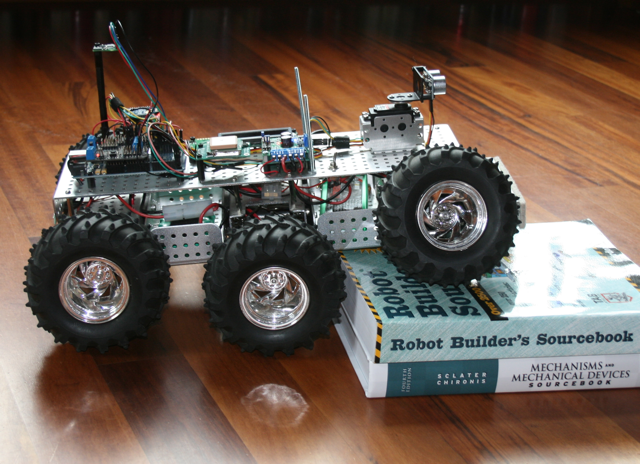
Thanks to the shock-absorbing independent suspension of each of its six wheels, Trekker rolls over pretty much anything
Software Modes
We programmed Trekker with a several different modes he can operate in:
- Navigate autonomously to a series of user-provided Longitude/Latitude Waypoints
- Roam autonomously using swiveling front sensor to avoid obstacles and find best path
- Radio Control (RC) – display commands and motor speeds on LCD
- Radio Control (RC) – display longitude, latitude, and heading on LCD
Technical Specifics
- Microcontroller: Arduino Mega
- IO Shield: DFRobot
- Motor Controller: Pololu Trex
- Radio Control Software: Beatty Robotics
- Automated Navigation Software: Beatty Robotics
- GPS: Parallax
- Sonar: Ping
- Sensor Servo: Hitec
- Chassis Parts: Dagu
- Magnetometer: Devantech
- Radio: Xbee
- Batteries: NiMH (electronics) + LIPO (motors)

I want to make this in my home. send me every little detail of making it.Send me the blue prints,software and everything i need to know about while doing this thing.plz Send me the details to my mail.
i have passion for robotics.i want to make robot like u have made.please send me files and instructions on my email khushmeetsingh1996@gmail.com
i have passion for robotics .please send me files and instructions on how u made it please send it on khushmeetsingh1996@gmail.com thanks
thanks for update….
but i want can u send me the files of your software of ur bot trekker…
Are you serious? Stop asking questions like this. How about you take a few minutes, use Google, and try to teach yourself something instead of trying as hard as possible to have someone hold your hand while you make an exact copy of their work.
Great work ! really fan of your robots!
Fantastic robot! I’m wondering whether the Wild Thumper Arduino Dual 15A DC Motor Controller would be as suitable for this robot? Also could a regular arduino work with this 6 wheeled chassis if you just wanted obstacle avoidance or remote control?
swhobbs: Thanks for the positive comment! 🙂
In answer to your questions: The Wild Thumper Motor Controller did not exist when we built this robot. But it would be totally perfect for this robot. In fact, the Wild Thumper motor controller was designed specifically for this chassis. We have bought one of the Wild Thumper controllers to play with, but we haven’t tried it yet. Regarding your Arduino question: You can use a regular Arduino for this sort of project. You don’t absolutely need the Mega. You could use an Uno or even a Nano. However, one of the reasons we used the Mega is because it has multiple dedicated hardware-based Serial ports, which makes serial communication much easier (which is good because we communicate with several of the components using serial communication). If you don’t use a Mega, then you need to do this using “Software Serial,” which is doable, but it ranges from mildly tricky to extremely tricky depending on the situation. Since building Trekker, we’ve done some Software Serial work on some of our other robots, and it is feasible, but it’s more challenging than using the Mega’s dedicated ports.
Hi my name is Sheldon Kaye, I am a show manager at the new show APPCON. APPCON is a moilbe application developers conference & expo which is being help in Las Vegas, Nevada August 24-26.During APPCON we plan on holding a Hackathon competition where we envisioned moilbe developers programming robots to compete with each other in games or something similar.Your cell bots would be absolutely perfect for this competition, and I was hoping I could talk to you further about this opportunity.If this interests you please email me or call me at 702-450-7662 ext. 124Hope to hear from you soon!
Hi, we are very impressed by your realisations and are actually working my daugthers and I on similar project (an environnemental explorer with a embedded webcam and sensors). We first thought of à tank module for the motor section, did you évaluate this option ?
We wonder wether also if an arduino mega would make the job with the remote control, the pwm, the sensoriel (temp, moist, light…) and the vidéo transmission?
Thank’s for your advice and it’s réally a good job!
Dominique
Hello, Dominique. Yes, we’ve done some work with tank treads. They are fun. But in terms of practicality, the tires and arrangement shown on Trekker are much better for traversing difficult terrain. And yes, the Arduino Mega would make an excellent controller for a robot. That is by far our favorite controller. We use the Mega to build all sorts of stuff. Yes, sensors for light, etc., are all achievable. Keep us posted and feel free to ask questions. We can help you design. You may want to check out the http://www.RobotShop.com (they have an English and French version). You may want to consider the DFRobot temperature sensor, light sensor, etc. There are many ways to do it, but this will make it easier.
Hi I would like to know, i am building a remote control rbot using the 6 wheel thumper,but buying the thumper controller is expensive,can i make use like you guys did ,of the arduino board. I might be able to get one here in Cape Town,can you perhaps help with wiring and schematics,software and how you did it it. Thanks would be appreciated.
Regards
Marinus
Marinus,
You don’t need the to use the Thumper Controller board to run this six-wheel chassis. Yes, you can use an Arduino board and a motor controller board (you’ll need both). But if cost is your concern, then the Thumper Controller’s cost ($74.95 at Sparkfun) isn’t too bad because you get both in a combined unit.
Camille.
We are looking at using a robot in a commercial application. Seems yours has all the features we require. Are you considering supplying them commercially ? or would be prepared to consider some other commercial arrangement ?
AWESOME! is that 34:1 motor?
Thank you. Actually, those are the 75:1 motors, not the 34:1 motors. I wanted more torque and less speed.
I want to make this in my home. send me every little detail of making it.Send me the blue prints,software and everything i need to know aboutwhile doing this thing.plz Send me the details to my mail.
Hello,
this is a fantastic robot !
I really fan
You can send my every little detail of making on my email ?
Thank you
( i’m french , so my english it very bad , sorry )
I am very impressed with what you girls have done with the Trekker in particular. Please review my recent email under your “Contact Us” section of this site. I have enjoyed looking through your website, and your girls are to be commended for what they have done and continue to do. I have a girl (6) and a boy (8) and have yet to really get them interested in robotics and related things. Perhaps having them see what you and your daughters are doing may spur their interest. Thank you.
I realley want to make this in my House, please send me the specifications to make this robot 🙂 Thank you.
Can you please send me your algorithm for navigation. This looks a tremendous accomplishment and I would like to study it..
Heloo
Can u give me details on this robot?
I am very interested to make this as my project
This is my email-
arebud2020@gmail.com
Thank you in advance!
Hi
Very nice robot indeed.
I have some parts from dagu and I’m trying to make the 4WD version of this.
Can you please measure for me the distance between the screws used to hold the motor mounts (T shaped plastic parts) to the chassis ?
Awesome design. I’m new to building robots and would like to learn. I want to build an autonomous, all-terrain rover that can navigate from point A to B. I have no idea where to even begin. Any suggestions? I feel I could learn a lot from your design if you are willing to share your procedures.
Hi Camille,
This is a very nicely done piece of work.
I am designing one myself based on the 6WD Thumper and intend to use the T’Rex controller.
BUT, I now realize there are TWO on the market with that name. Exactly which did you use?
Also, I notice that the 6 motors on the Thumper are rated at 6v ( 7.5 max.) Won’t a 3S Lipo burn them up at 11.4 volts?
What am I missing?
Thanks
Jim: Thank you. On this project, we used the TReX controller from Pololu (http://www.pololu.com/product/777), which is not to be confused with the T’Rex controller from Dagu (https://www.sparkfun.com/products/12075), which we’ve also used to drive this chassis, but not on this particular project. Regarding the motors: A motor is rated at a particular voltage, but can often be driven at a high voltage to get more torque and speed. This is not recommended for servos, but it is OK for drive wheel motors. For example, you can definitely over-volt a 6v motor to 7.4v volts. Overvolting a 6v with a 3S lipo (which is actually over 12 volts) is indeed a bit extreme and may reduce motor life, but we haven’t burned out a motor yet from overvolting. —Camille
Thank you, Rich. There is a parts list at the end of the page. If you don’t know where to begin, I would start out by purchasing an Arduino beginner kit (sometimes called an Arduino inventors kit), like the one from Sparkfun. Go through the example circuits and programs in that experimentation kit. You’ll learn a lot from that. Once you do that, you should be ready to build a rover.
Also, Rich, if you go to Sparkfun.com, you’ll find lots of good, new information on GPS modules and how to use them, including tutorials.
just found that – really nice done!
I’ve ordered the BT chassis to build some autonomous bot with similar functions as a test platform – that’s why it got my interest 😉
keep the great work and inspiration in all your projects!
Hai Camille,
I have to built a 6 wheeled robot for my class project. This is my first time to build a robot. Do you design the 6WD thempo by yourself? because i need to design such a big one that can carry a hexapod robot on it. May i know, all the components that you use to make the robot move? thanks in advance 🙂
Andy: The chassis is a 6WD Wild Thumper.
Ouh.. i see. how do you programmed the robot? Which microcontroller and what programming language that you used?
Andy: The microcontroller and language are Arduino.
Hello,
I’d like to make this robot for a community outreach program, do you think it is possible to email me all the blue prints, building instructions and parts list please.
the program is sponsored by a company called juxtopia
Hello,
I love this and all of your robotic projects. I understand that you are using the Pololu TReX Dual Motor Controller for this. Are you using one controller for all six motors? How is this wired? You said that you are using the 75:1 motors, what kind of speed are you getting with those? And finally, what size of LiPo batteries are you using? I have several 2000mAh batteries I use with my airplanes, would these be enough for more than 5 minutes of driving?
Thanks and again, great work!!
Larry
Hello,
I am interested in obtaining detailed information that you would care to share regarding the construction of the All Terrain GPS Robot. Is that possible? Thank you for your consideration. I am new to the site and have found it very interesting. This looks like a project that my son and I could get involved and with reasonable skill level. Thank you again for your consideration and its a terrific site. Berry
Hi Mr. Beatty,
i have a doubt about robot motion, you are using a symetrical pololu driver, this driver is desinged for 2 motors, but you have 6 in dagu wildthumper so my question is, how did you connect the motors to the pololu driver?, by the image it seems to work in group so, how did you fix the independent RPM for each motor while you connect in group? or in another word how did you solve that all motors go to the same RPM? it seems that you dont use feedback, please i hope your kindly response.
Omar: The three motors on the right side of the robot are wired to one channel on the motor controller. The three motors on the left side are connected to the other channel. When a side is given voltage, all the motors on that side get the same voltage so they all respond in the same way. No feedback is necessary. It works well.
Hi Again Mr. Beatty,
Thanks for your reply, please could you tell me how many volts are supplying your trex driver(to move the motors)? and also which is the interface between arduino and trex driver(serial, PWM with logical ports…)? and i know magnetometers are too sensible to metal and RF waves which method are you using to compensate the error provide by those factors? once again I hope for your kindly response, thanks.
OR
-On this robot we connect a 6V, 7.4V volt battery or 11.1V battery to the Trex. They all work fine. The higher the voltage the stronger/faster the motors will be.
-On this robot, and in general, we use serial communication between the Arduino and the motor controller.
-We discovered that the magnetometer didn’t work too well when we first mounted it on the metal robot, so them we mounted it at the top of a tall stack of nylon standoffs so that it was several inches away from the metal chassis. That solved the problem.
How did you go about incorporating your obstacle avoidance with your gps compas reading/application?
This was kind of tricky. The Arduino program loops. On each cycle, it looks for obstacles. If there are no obstacles, it moves forward on course. If there is an obstacle, it tries to go around it and find a new route.
Do you have your obstacle avoidance code posted anywhere as reference?
Do you plan to sell a kit of this robot ?
It would be a good idea. Many people (including me) seem to be interested…
How did you use the same battery to power the motors, GPS, Magnetometer and Arduino Mega?
Did you use Buck converters or linear voltage regulators to step down the voltage? can you advice what would be a better choice in a such a project?
Thanks.