Robots

Mars Rover

nyhs-logo

We have exciting news to share.

A short time ago the New York Hall of Science contacted us. They have a large and beautiful Mars exhibit, but their existing robot is outdated and needs to be replaced. After some discussion about their requirements, the girls and I agreed to work closely with the museum staff and build them a brand new, state-of-the-art Mars Rover robot for their exhibit. You may have noticed that we’ve been chronicling our work on the new rover in our Workshop Blog for the last several weeks. The girls have done much of the metal machining, mechanical assembly, soldering, wiring, and other work on the project. They will also be part of the on-site testing and installation in New York.

With over 450 interactive exhibits, the New York Hall of Science is the largest collection of hands-on science and technology exhibits in the New York City area, and rated as one of the best science centers in the country. They are actively involved in pioneering the Design/Make/Play revolution. Built initially as a pavilion for the 1964 World’s Fair, the New York Hall of Science is not only the region’s premier science museum, it hosts the world-renown New York Maker Faire each fall. We are honored to be working with the NYSCI and we’ve been having great fun (and many hours of hard work) building what we hope will be an excellent robot for them.

SCROLL DOWN FOR PICTURES AND A VIDEO.

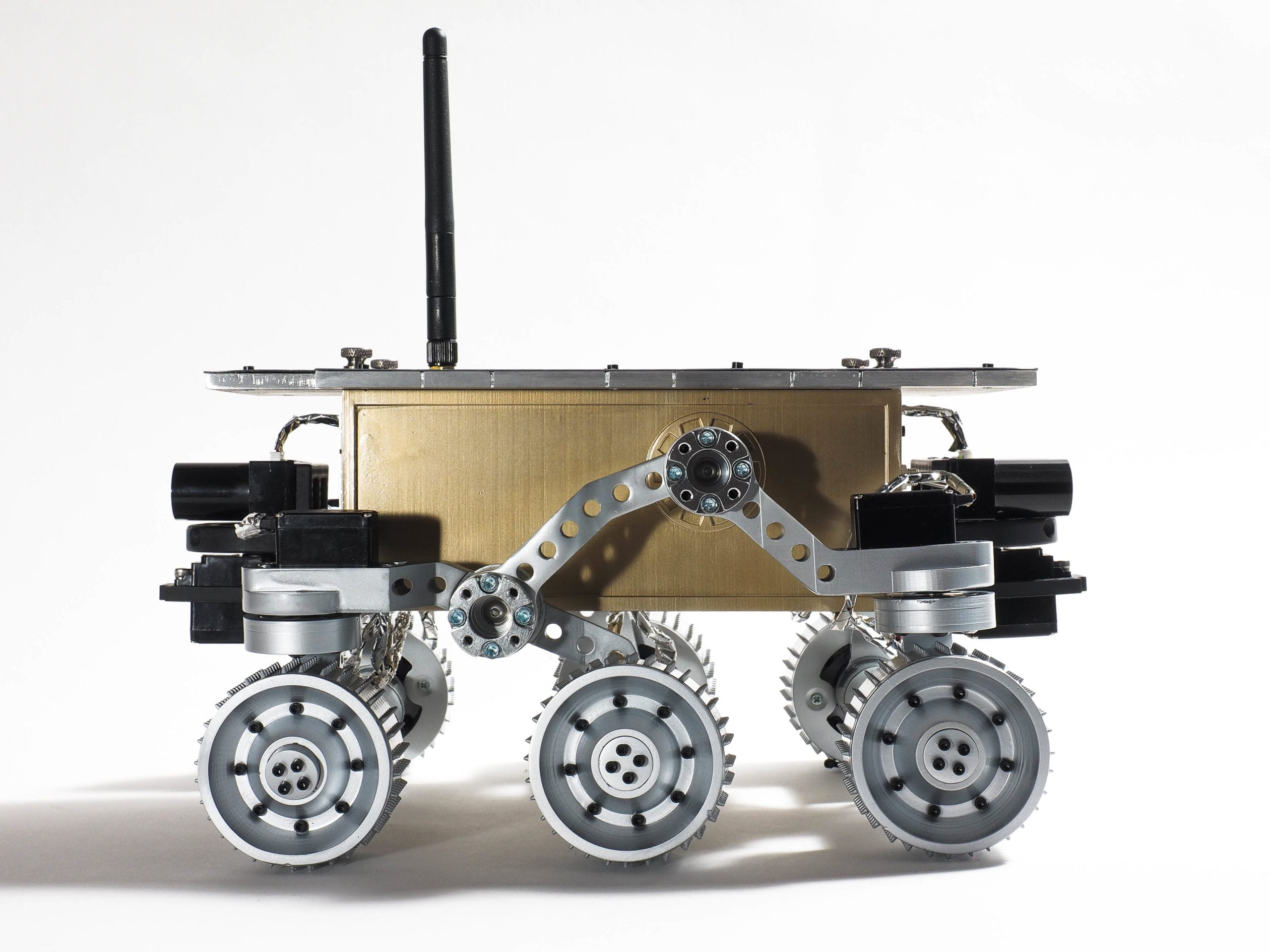
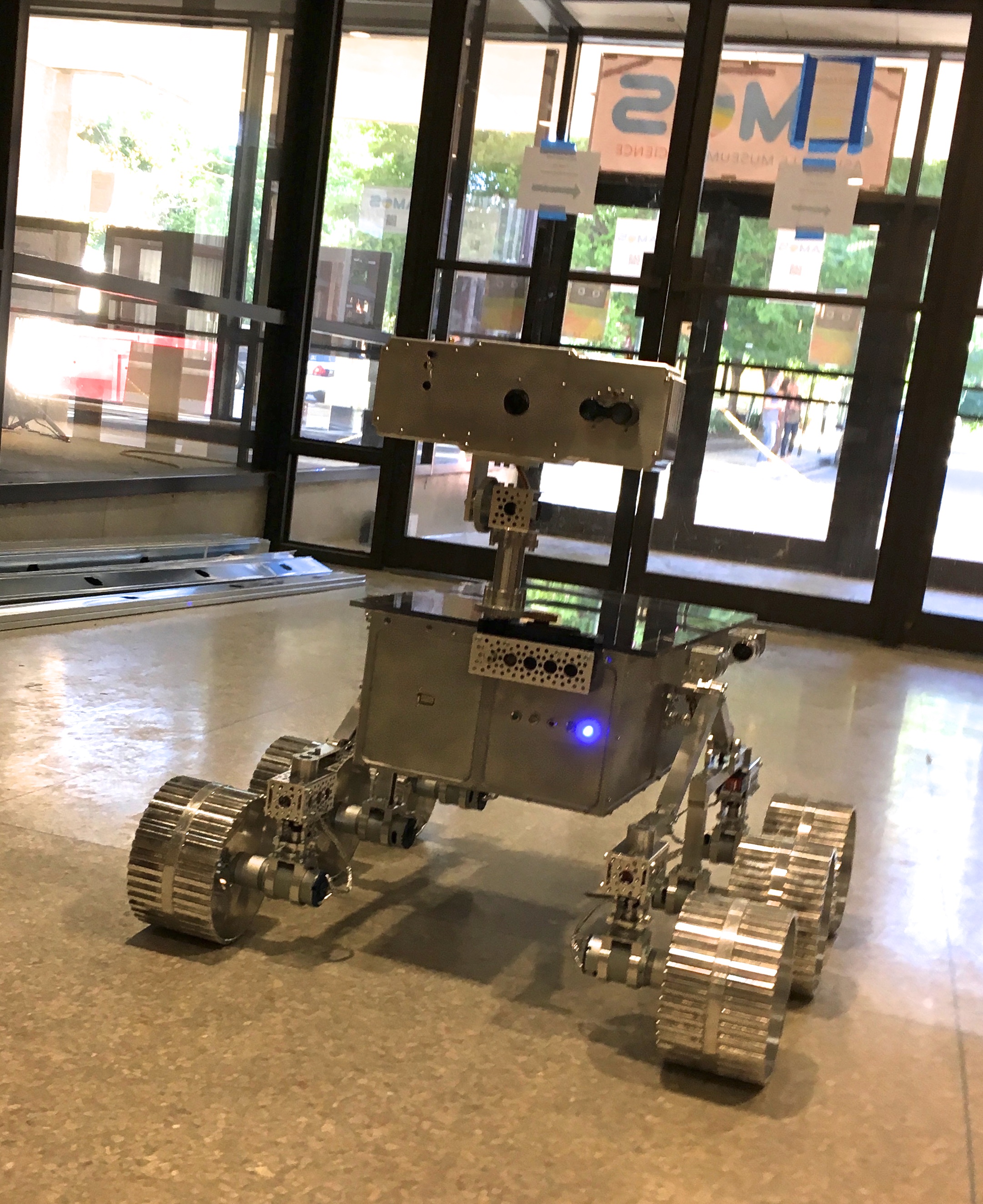
The Mars Rover is constructed of over 700 electrical components, aluminum parts, and other pieces that we purchase, make by hand, and/or machine on our homemade CNC Mill. In addition to the NASA-style six-wheeled rocker-bogie suspension system and the solar panels, the new Mars Rover is equipped with an infrared camera, a thermal array sensor, eight sonar sensors, and other technology. Using special control software that we will provide, kids and other visitors to the center will drive the Mars Rover remotely through the exhibit’s Mars-scape on a mission to find infrared-emitting rocks that may provide evidence of past life on Mars.

Here are the girls with the partially completed Mars Rover.

The girls in their NYSCI Design/Make/Play t-shirts with the partially completed Mars Rover.


Beatty Robotics: The dad and daughter team with the partially completed Mars Rover.

Beatty Robotics: The dad and daughter team.


The girls in the workshop.

The girls in the workshop.


Mars Rover - Top Corner View

Mars Rover – Top Corner View


Mars Rover - Front View

Mars Rover – Front View


Mars Rover - Side View

Mars Rover – Side View


Mars Rover - Rear View

Mars Rover – Rear View


read more

Terrabot

Today, we would like to introduce Terrabot, our Terrain Traveling Robot. Based on a modified “rock crawler” chassis, its primary purpose is to traverse rocks, branches, steep slopes, flower beds, boulders, mountain trails, and other extremely rough terrain.

Terrabot

Terrabot is equipped with 4-wheel steering (4WS). Two high torque servos shift machined aluminum linkages to rotate its front and back wheels independently. Note the navigation GPS on top of the back servo (on the left) and the sensor turret on the front (right). Terrabot's four wheels are driven by two powerful brushless motors (bright blue) and robust gearboxes (centered in each axle).

Terrabot's highly-articulated chassis is designed to twist up to 90 degrees as the robot is moving, allowing it to climb over huge boulders and other obstacles. In this picture, the chassis is articulated 45 degrees. Note that the back tires are still on the ground because the center linkages of the bot are twisted.

Terrabot's topside electronics include a tiny Arduino Nano (lower left), an XBee Radio (right), and a 9-DOF Mongoose Inerntial Measurement Unit (IMU). The IMU measures the degree of tilt and the rate of acceleration in the X, Y, Z planes, which we plan to use for our stabilization algorithm.

Terrabot's other electronics are stuffed into the little chamber inside the aluminum core (note the blue LED at the bottom of the picture). This includes the two Electronic Speed Controllers for the motors, the Pololu Maeastro motor/servo controller, the power rails, various voltage regulators, and other electronics. The navigation GPS (see the first picture), is mounted on top of the rear servo so that it has a clear view of the sky.

Terrabot Side View, showing the shocks, the frame, and LIPO battery beneath. Note the "roll posts" we installed on the top to protect the topside electronics if Terrabot falls off a rock during a climb and flips over. (We learned this one from experience!)

Terrabot Front View. There are three sonars mounted in the sensor turret, which rotates 270 degrees when the robot "looks around" to determine the best course through obstacle-ridden rough terrain.

For more pics, refer to Building Terrabot.

read more

Spirit II Mars Rover

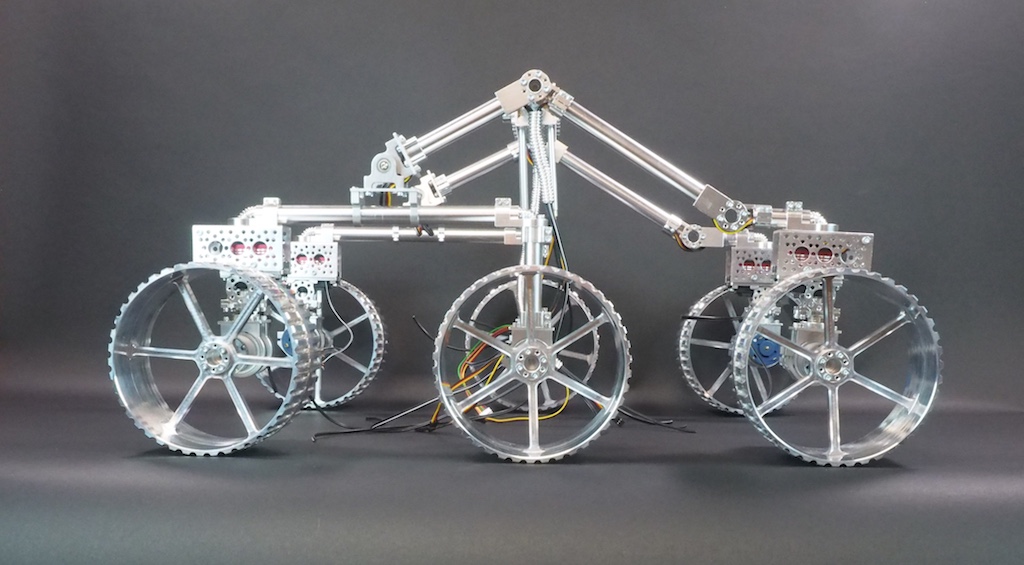
Mars Rover - Side View

The girls and I have always loved the Mars Rover robots Spirit and Opportunity, so we decided we would build one of our own. Today we would like to introduce our Spirit II Mars Rover, which we designed and built in honor of the great Spirit I that explored Mars for more than five years and gathered evidence that there was once liquid water on the Red Planet. The true challenge and fun of building Spirit II was to study and reverse engineer how NASA built theirs. The NASA rovers have several unique and very specific characteristics that we wanted to incorporate into our robot, especially the “rocker-bogie suspension system,” which allows the rover to roll over rocks that are 50% the height of the front

Mars Rover - Corner View

wheel (try that in an automobile!). We watched videos, read the NASA white papers, and even studied their patents. The key to the suspension system was the configuration of the wheels, the multi-jointed swiveling chassis, and a special counter-rotating differential that we built. Mars Rovers also have a very unique way of turning: they use servos to rotate the wheels at each corner 45 degrees, then spin to the desired heading. And, of course, Spirit II is solar powered like the original. Although it was difficult, in the end, we are very pleased with how Spirit II turned out. Enjoy the pictures and video below.


Here are a few construction photos (click the picture to see larger image):

Here we are working on one side of the rocker-bogie suspension system.

Here we're working on the counter-rotating differential and how it connects to the rocker-bogie suspension system. When the robot rolls a front wheel over a large rock, the suspension system tilts upward. The differential turns the rotation in the opposite direction, thereby tilting the opposite side of the robot downward to make sure the robot's center box stays steady and level.

Here we have assembled the back half of the rocker-bogie suspension system.

The Counter Rotating Differential we designed and built for our Mars Rover.

Here we are assembling the wheels, each of which has dozens of pieces. We cut the aluminum shafts, screw the wheel plates together, assemble the universal hubs, attach the treads, and on and on...

Mars Rover - Inside View


Mars Rover postings in our Workshop Blog


Technical Specifics

  • Design and Construction: Beatty Robotics
  • Software: Beatty Robotics
  • Microcontroller: Arduino Mega
  • Aluminum sheet & tubing, gears, fasteners, hardware, and much else: McMaster-Carr
  • Motor Controller: Dimension Engineering Sabertooth 2×12
  • Motors: Lynxmotion
  • Servos: (4) Hitec Digital + (1) Hitec for pancam
  • Servo brackets, hubs & other hardware: Servocity & Lynxmotion
  • Aluminum tubing & hardware: ServoCity
  • Solar Panels, wires, cameras, and much else: Sparkfun
  • Battery: 12V Lithium-Polymer
  • Radio: Xbee
  • Remote Control Hardware & Software: Beatty Robotics
  • Wheels: (6) Vex Robotics
  • Wheel Hubs and other hardware: AndyMark
  • Voltage Regulators: Pololu & Dimension Engineering
  • Relays: DFRobot
  • Differential: Beatty Robotics

read more

The beginning of KitBot

We have had a number of friends and family members ask how they can get started in robotics. They are interested in building a robot, especially a vehicle of some sort, but they don’t know where to begin. So, the girls and I have been working on the design for a small, inexpensive, easy to build, multifunctional, Arduino-based, programmable robot that will require basic robot building skills, but nothing too fancy. We call it “KitBot.” Our hope is to be able to help people get started. It will be able to function autonomously, but also by RC. It will include many off-the-shelf parts, a basic rover design, motors, servo, sonar sensor, sound, LED lights, and so on. These are our first pictures, which show the beginnings of the initial test project. It’s not done yet, but you can see the direction we’re moving. We have also sent all the parts to build a KitBot to a father and son team to be our initial Guinea Pigs (they wanted to try building it for a school project). As the girls and I work on refining the design and features, we’ll see how the father-and-son team does with the initial construction.


Julajay soldering the power wires to the KitBot's motors

Lunamoth assembling our KitBot chassis

KitBot: Top View

KitBot: Corner View

KitBot: Front View

KitBot: Side View

read more

Black Dragon

Today, we would like to introduce Black Dragon, our newest flying robot quadrotor. This newest flyer incorporates everything we’ve learned to date about ease-of-use, modular maintainability, crash resistance, lightness, and safety. While we constructed all our previous full-sized quadrotors with aluminum, we designed and built this new flyer with super-cool carbon fiber material. This particular type of carbon fiber, which carries the brand-name “Dragon Plate” (www.dragonplate.com), is used in the aerospace and defense industry, among others. It’s very light, very strong, looks fantastic (the photos don’t do it justice), and is surprisingly machinable.

BLACK DRAGON: Our first carbon fiber quadrotor

Our CAD drawing for the Black Dragon frame design


Our Carbon Fiber Frame

Carbon Fiber Arm. Note that we drilled the motor holes and landing gear holes directly into the arm in order to reduce parts

Like our previous quadrotors, we are using the Arduino-based ArduPilot Mega board as the main controller, a 3-axis Inertial Measurement Unit shield (IMU), a GPS for autopilot navigation, Magnetometer for heading control, and a Sonar for altitude control. The robot can be flown via an RC controller or on various autopilot modes. New features include a large illuminated toggle switch for easy on/off in the field, large main plates to hold electronics and wires, improved frame design, complete elimination of the motor mounts (which used to be susceptible to bending), an x-oriented frame (as opposed to +) to provide an open field of view for a camera mounted on the the front, and improved landing gear.

The carbon fiber material is excellent. We love it. It’s easier to machine and work with than we expected (even with the necessary safety precautions), it’s very attractive, but best of all it’s both very light and very strong. For example, the previous aluminum arms weighed in at about 50 grams each. The new arms are 21 grams each. The whole unit ways in at about 850 grams without the LIPO battery.


Close up view of some of Black Dragon's electronics


We’ve loaded the software into the microcontroller, calibrated the ESC/motors, double-checked the prop rotation, tested the sonar, set the magnetic declination on the magnetometer, confirmed the GPS is giving good long/lat, and it’s ready to fly. We’ve flown it a few inches off the floor indoors just to make sure it’s good-to-go and so far it seems excellent. Perhaps our best ever. As soon as the rain stops, we’ll be testing it in the big blue sky.

For more details on our various flying drone robots, go here.

I want to give special thanks to the folks at Dragon Plate for sending us their cool material.


read more

Mechatronic Tank

We would like to introduce Mechatron, our mechatronic tank. When we designed and built Mechatron we wanted him to be tough looking, industrial, and retro-futuristic, with lots of metal, rivets, and gears. He’s built entirely out of aluminum, brass, and steel, but inside, he’s chock-full of high tech electronics. See pictures and more text below. And be sure to watch the video to see Mechatron in action!

  • http://beatty-robotics.com/wp-content/uploads/2011/08/mechatron_top.png
  • http://beatty-robotics.com/wp-content/uploads/2011/08/mechatron_side.png
  • http://beatty-robotics.com/wp-content/uploads/2011/08/mechatron_front.png
  • http://beatty-robotics.com/wp-content/uploads/2011/08/mechatron_corner.png
  • http://beatty-robotics.com/wp-content/uploads/2011/08/mechatron_gun.png
  • http://beatty-robotics.com/wp-content/uploads/2011/08/mechatron_gears.png
  • http://beatty-robotics.com/wp-content/uploads/2011/08/IMG_5018.png
  • .
  • .
  • .
  • .
  • .
  • .
  • .


Mechatron includes special wheels with rollers slanted at 45 degree angles and driven by dedicated gearboxes, four powerful motors, and a software-controlled drive system that we wrote that operates each of the wheels independently. The result is that he can move in any direction at any time in any orientation. In other words, he can drive forward and backwards or turn like a normal vehicle, but he can also drive perpendicular to the direction he’s facing or at any desired angle. Weighing in at forty five pounds, he is by far our heaviest robot, but he is also our most agile, which makes him tremendous fun to drive.

Mechatron’s gun turret pans 360 degrees, includes 8 range-finding sonars for target detection, a laser, and a high-powered electric automatic weapon that shoots brass or plastic pellets. Ammunition is fed from the base of the robot up through one of the articulated metal tubes attached to the turret (the other tube contains wires). He can fire extremely rapidly while standing still or moving.

Strips of 52 programmable RGB LED lights have been mounted on Mechatron’s underside and within his turret. The turret LEDs indicate the robot’s current mode and whether the weapon system is armed. The LEDs on the underside change color depending on the direction of each of the individual wheels (Blue = Stopped. Green = Forward. Red = Backward), which helps to illuminate how Mechatron’s unique drive system works.

Mechatron is designed to function in a variety of different modes, including both user-controlled Radio Control and/or fully-autonomous. For the RC mode, we built our own controller which matches Mechatron in look-and-feel. The left joystick controls the pan and tilt of the gun turret and includes the firing button on top (which is armed using the missile switch). The right joystick controls the drive system. Forward and Backward motion (Y-axis) moves the robot forward or backward. Twisting the joystick turns the robot in the direction of twist (Z-axis). Moving the joystick left or right (X-axis) causes the robot to strafe left or right while maintaining his current orientation. Combined X-Y-Z joystick motions create unique and agile movements, such as strafing in circles. The robot can move in any direction, while panning and tilting its turret and firing all at the same time.


Technical Specifics:

  • Overall Design:   Beatty Robotics
  • Arduino Software: Beatty Robotics
  • Metal armor plates: Beatty Robotics
  • Main Microcontroller: Arduino Mega 2560
  • Microcontroller used for controlling LED lights: Arduino Nano
  • Light Controller Software: Beatty Robotics
  • Wheels: AndyMark (special thanks to Andy Baker, who was great to work with on these)
  • Drive Gears: Modulox (special thanks to Dan Richardson at iR3 Creative Engineering & Andy Baker at AndyMark)
  • Pan-Tilt gears and other parts: RobotZone (special thanks to ServoCity)
  • Pan-Tilt Servos: Hitec Digital
  • Sonars:  (12) Maxbotix MaxSonar Ultrasonic Sensors
  • Turret Sensor Head: Beatty Robotics
  • RGB LED strips:  Adafruit (Go Blinky Belt!)
  • MP3 Sound Board:  Sparkfun MP3 Trigger
  • Servo Controller: Pololu Maestro
  • Voltage Regulators: Pololu & Dimension Engineering
  • High-amp Relays: DFRobot
  • Motor Controllers: (2) Dimension Engineering Sabertooth 2×25
  • Motors: (4) CIM
  • Wireless Communication:  Xbee Radio with Sparkfun Xbee Explorer Regulated board
  • Joy Sticks: (2) 3-axis hall-effect joysticks from CH Products
  • Batteries: (1) 12v 3-cell Lithium-Polymer 20C
  • Aluminum, hardware, fasteners, wire, tools, and much else: McMaster-Carr
  • Wire, electronic components, IC boards, and much else: Sparkfun & RobotShop

read more

Our First Robot

For the story of our first little robot, I.C. 12, please visit the About Us page.

The girls showing off the early stages of their first I.C. 12 robot

OUR FIRST ROBOT: I.C. 12


A proud roboticist holding her first robot (I.C. 12)

I.C. 12 on the workbench

read more

Security Robot


Security Robot

Security Robot

Security Robot - Top View

read more

Creepy Crawler Robot

Having created several robots that roll on wheels of various kinds, we decided to build a robot that walks, or more accurately, crawls, in a spider-like fashion. We call him Crawler. We control this robot using a PS/2 remote control. Each leg has three Degrees of Freedom (DOF) so his gate and other movements are very creepy and biological. To create Crawler’s head, we hacked into a PS/2 receiver and installed the red receiver lights (LEDs) so that it looks like he has glowing eyes.

  • http://beatty-robotics.com/wp-content/uploads/2011/08/IMG_4774.png
  • http://beatty-robotics.com/wp-content/uploads/2011/08/IMG_4777.png
  • http://beatty-robotics.com/wp-content/uploads/2011/08/IMG_4776.png
  • http://beatty-robotics.com/wp-content/uploads/2011/08/IMG_4779.png
  • .
  • .
  • .
  • .


Technical Details

  • Servos: 12 Hitec HS-645, 6 HS-485
  • Remote Control: PS/2
  • Batteries: NiMH & NiCad
  • Legs and body pieces: Lynxmotion, black anodized aluminum
  • MicroController: Bot Board/SSC-32

read more

All-Terrain GPS Robot

After building a number of indoor robots, we decided to build an outdoor robot capable of traveling through rough terrain. We call it “Trekker.”

TREKKER ROBOT. Six wheels. Six motors. Batteries below deck. Electronics above deck.

First, we put together a six-wheel independent suspension with a separate motor on each wheel and large knobby tires. Each wheel moves up and down separately, which allows this little beast to climb up and over just about any obstacle (rocks, slopes, cats, whatever gets in its way). Here is a video of Trekker going over a large pile of books.


This is by far our funnest robot to drive via Remote Control, but this true magic of Trekker is his navigational capabilities.

We wired Trekker with a GPS chip and a tilt-compensated magnetometer (an electronic compass that works even when the robot is tilted). When Trekker first comes on, he automatically looks for and synchs with as many satellites as he can find in the sky (usually about 10-15). We programmed Trekker to determine his exact latitude and longitude position using the GPS as well as his directional orientation using the magnetometer. He then travels on his own to a series of latitude and longitude waypoints (that we get from Google Earth). Trekker’s navigational algorithm was one of our most ambitious software challenges to date. Our favorite test run is to put him in our backyard and give him instructions to drive around the big tree, down to the barn, drive around the goat pen, and return to us. He does it beautifully, all on his own, moving systematically from one waypoint to another. We also equipped him with a forward-facing sonar, which swivels back and forth on a pan servo, to avoid trees and other large obstacles along the way.

Trekker Robot - Top View - The white square in the middle is the GPS, which is used for navigation. When traveling between waypoints, the Longitude and Latitude display on the little LCD screen.

Trekker - Front View - This provides a nice view of the sonar at the front of the robot, which is used for obstacle detection and avoidance when traveling in automated mode. The magnetometer (compass) is mounted on a tall shaft at the back of the robot to keep it clear of interference from the other electronics, especially the radio.

This picture of Trekker's underside shows how each wheel connects to a separate motor (black t-shaped things). Each motor housing is on springs and swivels so that it moves separately from the other motors.

Thanks to the shock-absorbing independent suspension of each of its six wheels, Trekker rolls over pretty much anything

Software Modes

We programmed Trekker with a several different modes he can operate in:

  • Navigate autonomously to a series of user-provided Longitude/Latitude Waypoints
  • Roam autonomously using swiveling front sensor to avoid obstacles and find best path
  • Radio Control (RC) – display commands and motor speeds on LCD
  • Radio Control (RC) – display longitude, latitude, and heading on LCD

Technical Specifics

  • Microcontroller: Arduino Mega
  • IO Shield: DFRobot
  • Motor Controller: Pololu Trex
  • Radio Control Software: Beatty Robotics
  • Automated Navigation Software:  Beatty Robotics
  • GPS: Parallax
  • Sonar: Ping
  • Sensor Servo: Hitec
  • Chassis Parts: Dagu
  • Magnetometer: Devantech
  • Radio: Xbee
  • Batteries: NiMH (electronics) + LIPO (motors)


read more